Origin 2015 Features
Origin 2015 Highlights
The table below only lists some highlights of Origin 2015. To see more features in 2015, please use the navigation bar on the left panel of this page.
Origin Interface
JIRA | SUMMARY | DETAILS |
|---|---|---|
Find Metadata in Project | Sample OPJ to try: Choose menu "File: Open Sample OPJs: Analysis" Find in Projects Dialog
Menu and Context menu open Find in Project (F3)
Tooltip and Context menu for findings
| |
Project Explorer Improvement: Graph Previews in Project Explorer | Graph Preview When Moussing Over Extra Large Icons to Show Graph Previews Note:
| |
ORG-10413 | Project Explorer Improvement: Folder Comments | Project Explorer Folders now support comments just like books or graphs. The ability to dump folder tree with descriptions has also been added to the pe_dir X-Function. The following new variables were added to pd_dir: 1. "recursive" for searching subfolders. 2. "display", only useful when recursive=1. It has 3 options: tree, tree with description (for folder, it is Comments; for window, it is LongName), and flat (separate with CRLF) 3. "sensitive" for case sensitive. |
ORG-11067 | Project Explorer Improvement: Comments tooltip when Moussing over Folder/Windows | Tooltips to Show Comments from Folders and Windows Tooltips to Show Notes Window Contents |
ORG-7727 | Project Explorer Improvement: Show/Hide Column context menu | Details view in PE is now similar to Explorer and right-click will allow easy control of which column to display. You can now also show Name column together with Long Name and Short Name. |
ORG-11432 | Project Explorer Improvement: In-Place Edit of Comments, Long Name, Short Name | Support in-place edit of Name, Long Name, Short Name and Comments columns in PE.
Edit both short name and long name in in-place edit mode of Name column.
|
ORG-11150 ORG-10819 ORG-7727 | Other Improvements in Project Explorer | Bold Active Window Line Easy to tell which window is active. Follow Windows Text Sorting Criteria In the past, sorting only takes care of numbers at the end of name. Now even names like Graph10a, Graph1a, Graph2a will sort properly. Duplicate Window in PE |
ORG-9889, ORG-10413, ORG-9889 | Window/Folder Properties dialog Improvement | Meta data support for PE folder (Comment, User Tree) Right click folder and choose Properties to add comments and user tree Window Properties dialog with more common options like user variables
|
ORG-10962 | Sheet Comments | When right click sheet name, we used to have a Comments... context menu to edit comments. We have changed it to Name and Comments... context menu. It opens a new dialog to edit Short Name, Long Name and Comments. When hover over sheet tab, Short name, long name and comments all show as tooltip. It also indicates what the display name is in bold in tooltip. |
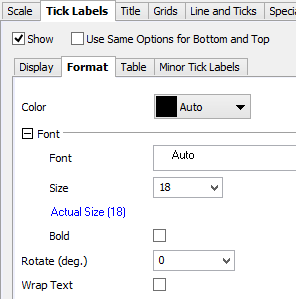
ORG-10198,ORG-9668, ORG-10524, ORG-11534, ORG-11132, ORG-104, ORG-10180, ORG-10277, ORG-10312 | Axis dialog Improvements | Better Layout of the Axis Dialog
Second level Tabs on Tick Labels tab
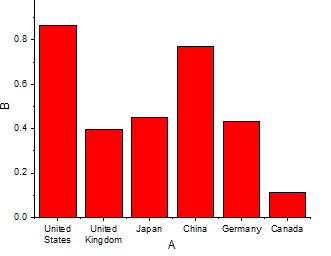
Wrap Tick Labels
Customize Multiple Axes Together E.g. highlight both Horizontal and Vertical icons on the left, Set both Scale Type to Log10 together. Control Line and Ticks Display separately
Customize individual special ticks
Custom scale formula for 3D OpenGL axis |
Other GUI Changes in Origin 2015 | Graphing and Plotting
| |
Colored Paires of Parentheses in Function Formula | Origin colors the parentheses in a formula, that both closing and opening are the same color. This helps you see which ")" goes with which "(": This is supported in dialogs that accept a formula such as:
| |
Grouped Plot dialog | Hint tab added in Grouped Column Plot, Grouped Box Chart dialogs. Labels are improved in the dialogs. Grouped Column Plot - Indexed DataGrouped Box Chart - Indexed DataGrouped Box Chart - Raw Data | |
Collapsible Menu and Context Menus | Now most of the menu/context menu will be collapsible so user do not need to go through all options every time. Note: To turn off the collapsible menus and show full menus, please look at the page below http://www.originlab.com/doc/Quick-Help/collapsible-menu
Note: Once the hidden menu is selected, it will be shown as the commonly used ones in the collapsible menu in the next time. | |
Data Info. Improvements | Go to Worksheet context menu in Data Info/Data Display windowWith Graph window active, choosing Go to Worksheet context menu in Data Info. and Data Display window will highlight corresponding row in worksheet. Go to Graph context menu in Data Info. windowWith worksheet active, choosing Go to Graph context menu in Data Info. window will go back to Graph window. | |
ORG-11637 | PE: View Extra Large Icons context menu is added (SR1) | In Details view of bottom panel in Project Explorer, if there are many windows and they fill up the space, right click will not show View context menu to switch view mode. |
ORG-12155 | Combine entries in File Types dropdown list of File: Open dialog. (SR1) | Customer complained there are too many entries in File Types dropdown list which isn't convenient to use. Some entries are combined so user doesn't need to switch File Types that often. |
ORG-12196 | In Project Explorer, when click on the worksheet to rename we add a bigger toggle button and a hot-key to control to either rename Short Name or Long Name (SR1) |
|
ORG-12366 | Control font in Script Window (SR1) | E.g. in [Font] section of Origin.ini in your Origin's User Files Folder, add ScriptWindowFontHeight=24 |
ORG-12576 | Options to control the tooltip for windows in PE (SR2) | Set @PESH=0 to disable book comment tooltip. Set @PESS=-1 to show preview as Comments-style tooltip. |
ORG-3691 | Project Explorer: When it's unpinned, click X button on top of PE will hide instead of close PE by default. (SR2) | In the past, X will close PE and sometimes user doesn't know how to turn it on. So we changed the default behavior to be Hide PE if it's unpinned. System Variable @FDPC to control this: 0 : old way, close |
ORG-12644 | Menu File: Import: Customize... is renamed to File: Import: Add/Remove File Types... (SR2) | Make it clearer that our File: Import: menus is customizable. |
Graphing
New Graph Types
JIRA | SUMMARY | DETAILS | |||
|---|---|---|---|---|---|
Heatmap Plot | Menu to plot heatmap is Plot: Contour/Heat Map: Heat Map. Toolbar button can be found in the Contour group of 3D and Contour Graphs toolbar. (XYZ data is not supported yet) The plotvm dialog to plot heatmap and contour plot with virtual matrix is improved.
| ||||
2D Kernel Density Plot | Plot: Statistics: 2D Kernel Density...
|
Labels, Legend, Color Scale and Bubble Scale
JIRA | SUMMARY | DETAILS |
|---|---|---|
Bubble Plot Legend Support | Note we will show a nested bubble scale legend by default when there is column selected for Total Dissolved Solids in plotpiper dialog.
| |
Color Scale Improvements in Origin 2015 |
| |
ORG-10823 | Hide legend of hidden plots | Click Reconstruct Legend button will hide legends of hidden plots. Right click Legend and choose Show Legend for Visible Plots Only, or open Update Legend dialog, specify show/hide legend of hidden plots |
ORG-11601 | Reverse Legend Order | Right click Legend and choose Reverse Order. |
ORG-11650 | Hide Legend for Fitted Curves | Right click Legend and choose Hide Legend for Fitted Curves, or open Update Legend dialog, specify show/hide legend of Fitted Curves |
ORG-11611 | Drag and Drop to to arrange legend entries in multiple columns | Select the legend, drag and drop the legend border while pressing Ctrl button, when the horizontal space is enough for more column, the arrangement will change.
|
Plot Manipulation
JIRA | SUMMARY | DETAILS |
|---|---|---|
Allow users outside US to see graph page dimension in mm | In graph (Plot Details) Print/Dimensions Tab, the default value of the Units is Window(unit), which will be altered according to Windows: Customize Format: Measurement system:U.S./Metric.(To set this value, click Control Panel\Clock, Language, and Region,\Formats tab\Additional Settings.) Specifically, for United State and Great Britain, the default value would be Window(inch); for the rest of the world, the default value is Window(mm) | |
Box Chart Improvement | Custom percentile range of the box and Whisker
|